
Picture an Adelaide plumber searching their own business on Google and finding an AI summary answering the very questions their website was built to answer. The natural reaction is: “Should I just block Google’s AI from using my site?” Since August, Google has given every website owner a proper switch to do exactly that.
Before you flick it, though, it helps to know what the switch actually does, what it doesn’t do, and why for most Australian small businesses the answer is “probably not”. Here’s the plain English version.
What Google’s new AI control does
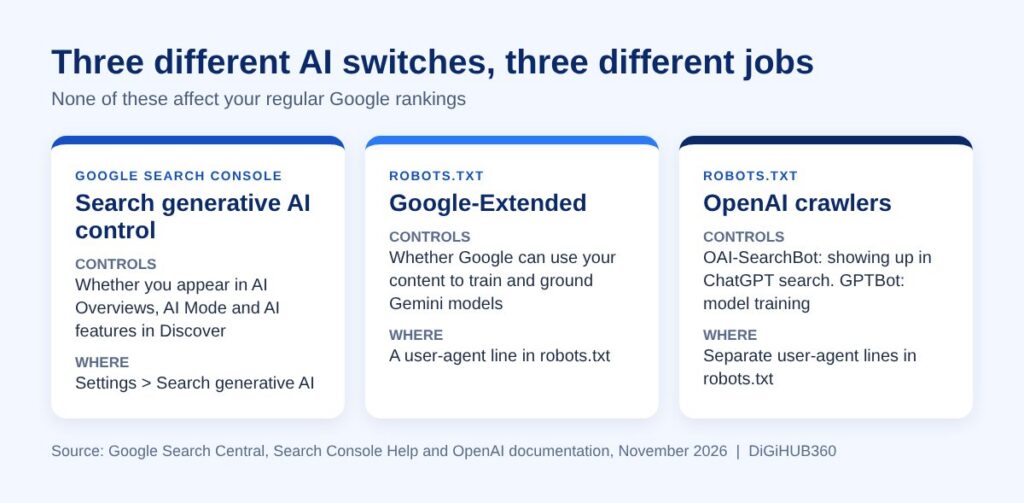
Google Search Console now has a setting called the Search generative AI control. According to Google’s Search Console Help page, it was rolled out to all websites worldwide as of 31 August 2026. You’ll find it under Settings > Search generative AI.
It lets you choose whether your site’s links and content can appear in Google’s generative AI features. Right now that covers:
- AI Overviews (the AI summary at the top of many search results)
- AI Mode (Google’s conversational search tab)
- Generative AI features in Google Discover
Google says it expects to add to that list over time. There are three options: include your site (the default), exclude it, or inherit the setting from a parent property if you have one set up in Search Console.
What happens if you opt out
If you choose to exclude your site, Google says links to your site and your content won’t appear in those AI features, and your content won’t be used as an input to generate AI answers. In Google’s words, “You won’t receive any traffic or impressions from these features.” Content from other websites will still show up, so the AI answer doesn’t disappear. Your competitors simply fill the space.
Google says exclusion generally takes a few days to kick in, with some content taking longer.
What it does not do
This is where a lot of the confusion sits. Google is clear on three points:
- It doesn’t affect your normal rankings. Google says the control “isn’t used as a ranking or inclusion signal affecting other parts of Search.”
- It doesn’t stop AI training. That’s a separate setting called Google-Extended (more on that below).
- It doesn’t remove you from Google. To hide a page from search completely you’d use a noindex tag, which is a very different (and usually bad) idea for a business site.
Don’t mix it up with the other AI switches
There are now a few different “block AI” settings floating around, and they each do a different job.
Google-Extended is a line you add to your robots.txt file. Per Google’s crawler documentation, it controls whether content Google crawls from your site can be used to train future Gemini models and to ground answers in the Gemini app and Google’s Vertex AI products. Google states it “does not impact a site’s inclusion in Google Search nor is it used as a ranking signal.” The same page notes Google plans to support a new shared industry signal for AI training preferences in early 2027, so expect more on this next year.
OpenAI’s crawlers are also handled in robots.txt. OpenAI uses one bot (OAI-SearchBot) to find pages for ChatGPT search results and a different one (GPTBot) for training its models. Blocking GPTBot doesn’t have to mean disappearing from ChatGPT search, but blocking OAI-SearchBot does.
So if your real concern is “I don’t want AI companies training on my content”, the training controls are the ones to look at. The Search Console switch is about visibility, not training.
Should your business opt out?
For most local and service businesses, we’d say no. Think about how your customers search. A Brisbane cafe owner looking for “commercial coffee machine servicing near me” or a homeowner asking “how much does it cost to rewire a house in Perth” may well see an AI answer first. If your page is one of the links cited in that answer, you’re in front of them at the exact moment they’re deciding. If you’ve opted out, you aren’t, and someone else is.
Google is also pushing more links into these AI answers. In an announcement on 15 October 2026, Google said it has made “continued and substantial increases to the presence of inline links” in AI Overviews and AI Mode, is showing them higher up in responses, and is making related article links more prominent with image thumbnails. More links means more chances for a well prepared small business site to be clicked.
When opting out might make sense
There are a few situations where it’s worth a conversation:
- Your business model depends on people reading your content on your site, such as paid research, courses or detailed guides you sell.
- You have clear data showing AI features are taking clicks without sending you enquiries.
- You have legal or licensing reasons to restrict how your content is reused.
Even then, make the call on evidence. Search Console now reports how your site performs in AI features, which we covered in our guide to AI Overview stats in Search Console. Look at that data before changing anything.
How to make AI features work for you instead
If you stay in, give Google good reasons to cite you:
- Answer real questions clearly. Put the direct answer near the top of the page, then the detail.
- Be specific and local. Mention the suburbs you service, your licences, pricing ranges and turnaround times.
- Keep your Google Business Profile current. Hours, services and photos all feed the local picture Google builds of you.
- Show you’re real. Author names, your story, real photos of your work and genuine reviews all help build trust.
What to do this week
- Log in to Search Console and check Settings > Search generative AI. Make sure it says what you expect (the default is include).
- Ask whoever manages your website whether anyone has changed robots.txt to block AI crawlers, and whether that was deliberate.
- Check your AI feature impressions and clicks in Search Console so you have a baseline.
- Pick your three most common customer questions and make sure your site answers each one clearly.
FAQ
Will opting out of AI Overviews hurt my Google rankings?
No. Google says the Search generative AI control isn’t used as a ranking or inclusion signal for other parts of Search. You simply won’t appear, or get traffic, from AI Overviews, AI Mode and AI features in Discover.
Does opting out stop Google training AI on my website?
No. Google says this control doesn’t affect AI training. To limit Gemini training you use the Google-Extended token in your robots.txt file.
How long does it take to take effect?
Google says it generally takes a few days for content to be excluded, and some content may take longer.
Should a small business block ChatGPT?
Usually not. If you want to appear in ChatGPT search answers, OpenAI’s OAI-SearchBot needs access to your site. You can block training separately through GPTBot if that matters to you. See OpenAI’s crawler documentation for details.
Not sure what your settings are?
If you’d like a second pair of eyes on your Search Console settings, robots.txt or how your business shows up in AI search, get in touch with the DiGiHUB360 team. We’ll give you a straight answer on what’s worth changing and what’s best left alone.
Disclaimer: This article reflects our understanding of Google’s and OpenAI’s settings and documentation at the time of writing (November 2026), to the best of our knowledge. Search and AI are changing constantly, and features, settings and guidance can shift quickly, so check the official sources linked above or talk to us before making changes to your site.